
Architecture
Network topology, service ports, and trust boundaries of a self-hosted Dreadnode deployment — for security review and network planning.
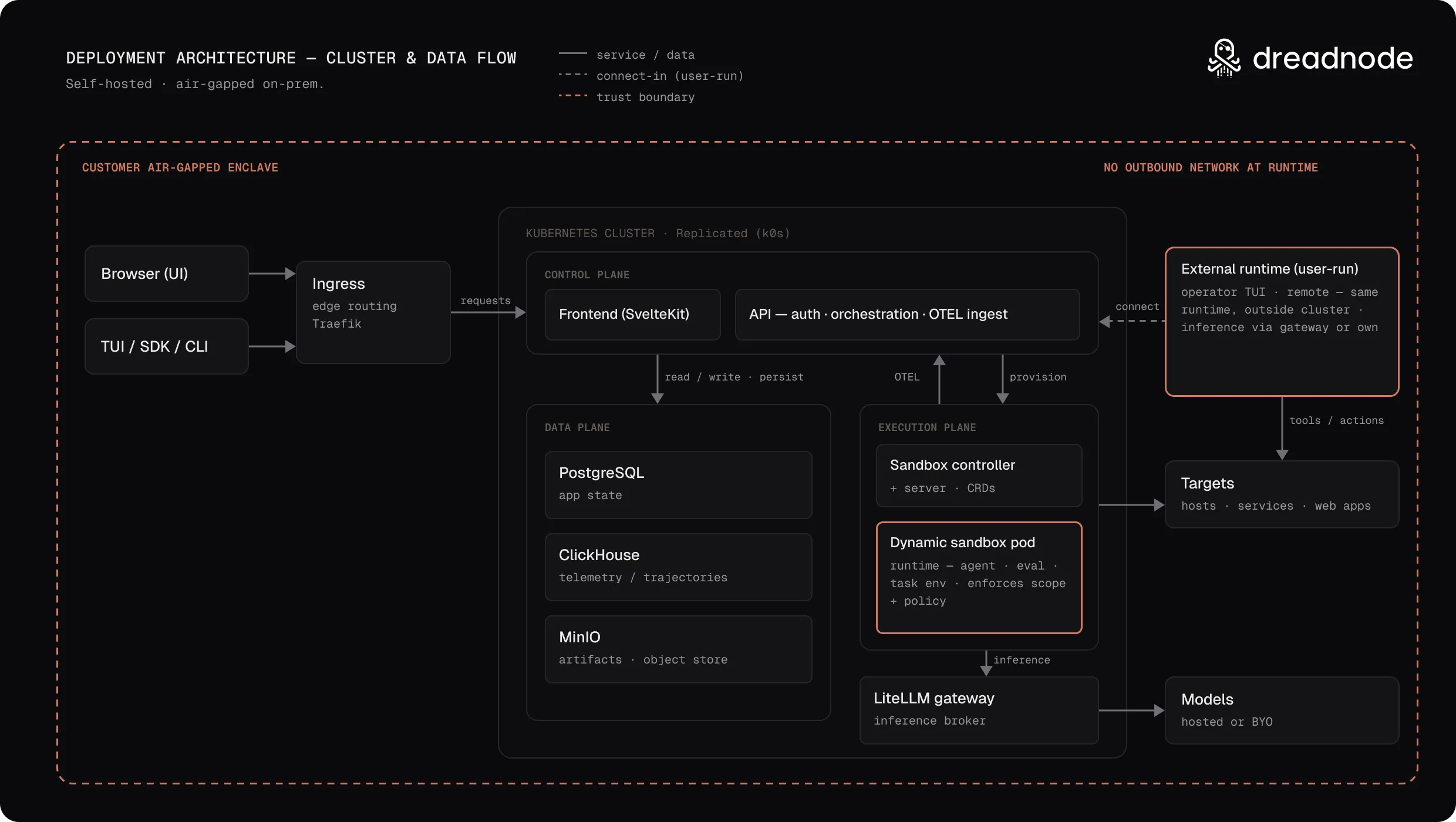
A self-hosted Dreadnode deployment is a single Helm release: two platform services, three data stores, and a sandbox runtime, all inside your Kubernetes cluster. User traffic crosses the cluster boundary through the ingress controller over HTTP or HTTPS; production deployments should use HTTPS. Replicated communication uses outbound HTTPS.
flowchart TB
Client["Browser · CLI · SDK"]
subgraph cluster["Kubernetes cluster"]
direction TB
Ingress["Ingress controller"]
Frontend["Frontend :3000"]
Docs["Docs :8080"]
API["API :8000"]
subgraph data["Data stores"]
Postgres[("PostgreSQL<br/>:5432")]
ClickHouse[("ClickHouse<br/>:8123")]
MinIO[("MinIO<br/>:9000")]
end
subgraph sandbox["Sandbox runtime"]
Server["Sandbox server :80"]
Gateway["Sandbox gateway :80"]
Controller["Sandbox controller"]
Pods["Sandbox pods"]
end
end
Replicated["Replicated endpoints<br/>images · license · updates"]
Optional["Optional external services<br/>SMTP · OAuth · Logfire · E2B"]
Client -- "443 · <your-domain><br/>storage.<your-domain><br/>*.sandbox.<your-domain>" --> Ingress
Ingress -- "/" --> Frontend
Ingress -- "/docs" --> Docs
Ingress -- "/api" --> API
Ingress -- "storage.<your-domain>" --> MinIO
Ingress -- "*.sandbox.<your-domain>" --> Gateway
Gateway -- "HTTP · WebSocket" --> Pods
Frontend -- "SSR" --> API
API --> Postgres
API --> ClickHouse
API --> MinIO
API -- "create / delete · exec · files" --> Server
Server -- "BatchSandbox CRs" --> Controller
Server -. "proxied exec" .-> Pods
Controller -- "creates" --> Pods
cluster -. "outbound HTTPS" .-> Replicated
API -. "outbound, if enabled" .-> Optional
classDef external stroke-dasharray: 5 5
class Replicated,Optional external
style cluster fill:transparent
style data fill:transparent
style sandbox fill:transparent
Four trust boundaries matter for review:
- External clients → ingress. All user traffic enters through the ingress controller on 443 (or 80). Nothing else is exposed.
- In-cluster services. Every service is ClusterIP-only. The data stores, the sandbox lifecycle server, and the sandbox controller are reachable only from inside the cluster.
- Browsers → sandbox runtimes. The sandbox gateway is the one exception to the boundary
above: it accepts ingress traffic on
*.sandbox.<your-domain>and forwards it to a runtime port inside a sandbox pod. It routes on the Host header without minting credentials — runtime HTTP endpoints require the bearer token issued when the runtime starts, and browser WebSocket handshakes require a short-lived, single-use ticket exchanged for that token. The lifecycle server’s own API stays off the wildcard Ingress. - Cluster → internet. Egress is limited to Replicated endpoints for image pulls and updates, plus any optional external services you enable. The platform receives no inbound connections from Dreadnode.
Request routing
Section titled “Request routing”The chart emits standard networking.k8s.io/v1 Ingress resources across three authorities:
| Host | Path | Backend service | Port |
|---|---|---|---|
<your-domain> | / | Frontend | 3000 |
<your-domain> | /api | API | 8000 |
<your-domain> | /docs | Docs | 8080 |
storage.<your-domain> | / | MinIO S3 API | 9000 |
*.sandbox.<your-domain> | / | Sandbox gateway | 80 |
MinIO gets its own subdomain because S3 SDKs sign requests against host+path — path-prefix
routing breaks signature validation. Browsers hit storage.<your-domain> directly when
downloading artifacts through presigned URLs.
The sandbox gateway takes a wildcard because each runtime gets its own hostname:
<sandbox-id>-<port>.sandbox.<your-domain>. The gateway parses that first DNS label, resolves
it against a cluster-wide BatchSandbox watch, and proxies the request — path, query, and
WebSocket upgrade preserved — to the matching pod and port. An unknown or ambiguous identifier
fails closed with a 404. All three authorities must resolve and be covered by your TLS
certificate; see TLS certificates.
The frontend also calls the API service directly over the cluster network for server-side rendering, bypassing the ingress hairpin.
Inside the cluster
Section titled “Inside the cluster”Platform services. The frontend is a SvelteKit SSR server; the API is a FastAPI application that owns all business logic, authentication, and data access. Only these two services (plus MinIO) receive ingress traffic.
Data stores. PostgreSQL holds transactional data, ClickHouse holds traces and analytics, and MinIO provides S3 object storage for packages, artifacts, and files. All three run in-cluster by default with persistent volumes, and each can be swapped for an external service.
Sandbox runtime. Agent code runs in isolated sandbox pods, created on demand:
- The API asks the sandbox server (a lifecycle HTTP API) to create a sandbox.
- The sandbox server writes a
BatchSandboxcustom resource. - The sandbox controller (a Kubernetes operator) reconciles the resource into a pod.
- Command execution, file transfer, and health checks go from the API to an exec daemon inside each sandbox pod, proxied through the sandbox server. The API never depends on wildcard DNS resolving from inside the cluster.
- Browser traffic to a runtime port takes the other path: ingress → sandbox gateway → pod.
Sandbox pods run in the release namespace by default and are created through the Kubernetes API using the controller’s RBAC-scoped service account. The chart ships no NetworkPolicies, so inbound traffic to your services follows your cluster’s defaults — see Network trust boundaries for the security model this implies and for policies you can apply yourself. Outbound traffic from a sandbox is a separate control: enable sandbox egress and each sandbox pod gets a filtering sidecar that needs nothing from your CNI.
Kubernetes footprint
Section titled “Kubernetes footprint”A default install creates these workloads, all in the release namespace:
| Component | Kind | Replicas | Persistence |
|---|---|---|---|
| API | Deployment | 1 | — |
| Frontend | Deployment | 1 | — |
| Docs | Deployment | 1 | — |
| PostgreSQL | StatefulSet | 1 | 8 Gi PVC |
| ClickHouse | StatefulSet | 1 | 10 Gi PVC |
| MinIO | StatefulSet | 1 | 10 Gi PVC |
| Sandbox server | Deployment | 2 | — |
| Sandbox gateway | Deployment | 2 | — |
| Sandbox controller | Deployment | 1 | — |
| Replicated SDK | Deployment | 1 | — |
The Replicated SDK ships with installs from the Replicated registry — both install paths — but is disabled in the raw chart. Database migrations run as an init container on the API pod, and a post-install hook Job creates the MinIO buckets — there are no long-lived Jobs or CronJobs. The chart installs no admission webhooks and no autoscalers. Credentials are auto-generated as Kubernetes Secrets; the Install with Helm page lists them.
Nine resources are cluster-scoped — everything else stays in the namespace:
- Three CRDs —
batchsandboxes,pools, andsandboxsnapshots, all in thesandbox.opensandbox.iogroup. All are kept on uninstall so in-flight sandbox resources aren’t orphaned. - Three ClusterRole/ClusterRoleBinding pairs — one for the sandbox controller (pods,
events, and the sandbox CRDs), one for the sandbox server (pods, services, configmaps,
events, the sandbox CRDs, and Secret create/delete for sandbox provisioning), and one for
the sandbox gateway (read-only
get/list/watchonbatchsandboxes, so Host routes fail closed rather than resolving an identifier it cannot see).
The API and frontend service accounts carry no RBAC rules — they exist for cloud workload identity annotations (for example, IAM roles for external data stores).
Network requirements
Section titled “Network requirements”Inbound:
| Port | Target | Required for |
|---|---|---|
| 443, 80 | Ingress controller | All user traffic |
| 30000 | Admin Console | Embedded Cluster installs only |
DNS — three records pointing at your ingress (or the VM for Embedded Cluster):
<your-domain>, storage.<your-domain>, and *.sandbox.<your-domain>. Installs running
E2B sandboxes instead of OpenSandbox need only the first two.
Outbound HTTPS:
| Endpoint | Purpose |
|---|---|
registry.replicated.com | Helm chart pulls (Helm CLI installs) |
proxy.enterprise.dreadnode.io | Container image pulls (license-authenticated) |
replicated.app | Installer download, license validation |
updates.enterprise.dreadnode.io | Application update metadata |
Air-gapped installs need none of these at runtime, with one caveat on the Helm CLI path:
the Replicated SDK keeps calling replicated.app until you set replicated.isAirgap. See
Air-gapped deployments below.
For agents in Slack, API pods also need outbound HTTPS and secure WebSocket access to Slack. See Slack networking and the deployment switch. Slack is unavailable on air-gapped installs.
Internal service ports (all ClusterIP):
| Service | Port | Protocol | Ingress-backed |
|---|---|---|---|
| API | 8000 | HTTP | <your-domain>/api |
| Frontend | 3000 | HTTP | <your-domain>/ |
| PostgreSQL | 5432 | PostgreSQL | No |
| ClickHouse | 8123, 9000 | HTTP, native TCP | No |
| MinIO | 9000 | S3 API | storage.<your-domain> |
| Sandbox server | 80 | HTTP | No |
| Sandbox gateway | 80 | HTTP, WebSocket | *.sandbox.<your-domain> |
Replicated components
Section titled “Replicated components”Installs from the Replicated registry run a small SDK deployment alongside the platform. It
reports license state and instance telemetry to replicated.app and checks for updates —
outbound only. Container images pull through proxy.enterprise.dreadnode.io using a pull
secret bound to your license; the chart wires this automatically.
Air-gapped deployments
Section titled “Air-gapped deployments”For environments with no outbound network at all, container images arrive ahead of the install rather than being pulled during it — inside an air-gap bundle on the Embedded Cluster and KOTS paths, or mirrored into your own registry for a Helm CLI install. At runtime nothing leaves your network: the platform, runtimes, models, and the targets you assess all sit inside your enclave.
Air gap requires an entitlement on your license and a release with a bundle built for it, both arranged with us up front. See Install in an air-gapped environment for the prerequisites and the procedure for each path.
Optional external services
Section titled “Optional external services”Everything below is disabled by default. Enabling one adds an outbound connection from the API.
| Service | Replaces or adds |
|---|---|
| External PostgreSQL | Replaces the in-cluster database (e.g. RDS) |
| External ClickHouse | Replaces in-cluster analytics (e.g. ClickHouse Cloud) |
| External S3 | Replaces MinIO (e.g. AWS S3) |
| SMTP relay | Adds transactional email delivery |
| OAuth providers | Adds GitHub, Google, or OIDC login |
| LLM gateway (LiteLLM) | Adds model inference for agents and chat |
| Logfire | Adds observability export |
| E2B | Replaces the in-cluster sandbox runtime |
Helm CLI vs Embedded Cluster
Section titled “Helm CLI vs Embedded Cluster”Both install paths deploy the same chart. The difference is who provides the infrastructure below it:
| Layer | Helm CLI | Embedded Cluster |
|---|---|---|
| Kubernetes | You (1.28+) | Installer (k0s) |
| Ingress controller | You (Traefik recommended) | Installer (Traefik, host ports 80/443) |
| Storage | You (any StorageClass) | Installer (OpenEBS) |
| DNS and app TLS | You | You (DNS to the VM; TLS Secret in kotsadm) |
| Configuration | values.yaml | Admin Console or KOTS ConfigValues |
For Helm CLI, the diagram above is exact — your ingress controller and load balancer sit in front. For Embedded Cluster, everything runs on one VM: Traefik binds ports 80/443 directly on the host, and the Admin Console adds the one extra inbound port, 30000. The application TLS Secret secures Dreadnode on port 443; the Admin Console has separate TLS configuration.