
Export
Export AI red teaming findings as an Apache Parquet file for analysis, evidence, and archival.
Export AI red teaming findings as an Apache Parquet file for data analysis, adversarial training, and compliance records. For configurable PDF and CSV reports, see Reports.
Download Parquet
Section titled “Download Parquet”Click Download Parquet from the top-right of the findings table to export the project’s findings as an Apache Parquet file.
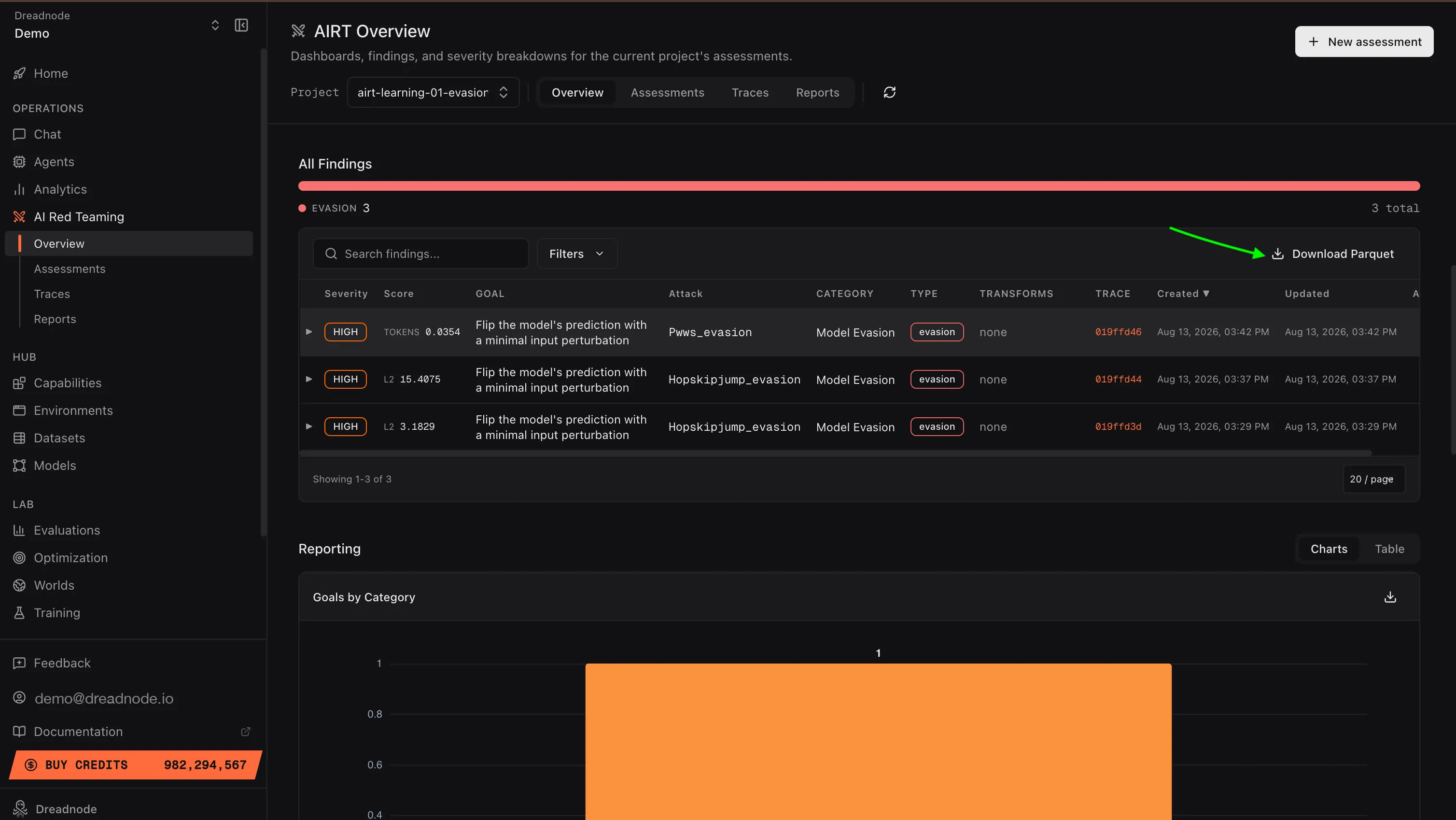
The export is one row per trial, not one per finding: each finding expands into its individual attempts, including pruned ones. Every row carries that trial’s evidence - the adversarial prompt, the target’s response, and the judge’s reasoning - plus the complete span tree, alongside the finding metadata. The columns are grouped below.
Identity and trace
| Field | Description |
|---|---|
schema_version | Export schema version |
org_key, workspace_key, project_key, project_name | Where the finding lives |
assessment_id, assessment_name | The assessment the trial belongs to |
trace_id, span_id | Link back to the full trace on the platform |
timestamp | When the trial ran (ISO-8601 string) |
Trial and finding
| Field | Description |
|---|---|
trial_index | Position of the trial within the attack |
trial_status | finished, pruned, failed, … |
score | Trial score (0.0 to 1.0) |
judge_score | Judge/evaluator score (0.0 to 1.0) |
is_jailbreak | Whether the trial met the jailbreak threshold |
jailbreak_threshold | Score at/above which a trial counts as a jailbreak |
severity | Per-trial severity from the trial score (lowercase: critical, high, medium, low, info) |
finding_severity | Finding-level severity from the best score (may differ from the per-trial severity) |
finding_type | Finding type. Generative attacks: jailbreak, partial, refusal, error. Traditional-ML (adversarial) attacks: evasion, degradation, robust, error |
Attack
| Field | Description |
|---|---|
attack_name | Attack strategy (e.g. tap_attack) |
goal | The attack objective |
goal_category | Harm category (e.g. malware_generation) |
transforms | List of transforms applied (a list<string>) |
Model
| Field | Description |
|---|---|
target_model, target_model_family | Model under test |
attacker_model, evaluator_model | Attacker and judge models |
Evidence and usage
| Field | Description |
|---|---|
attacker_prompt, transformed_prompt | The raw and transform-applied prompt sent to the target |
target_response | What the target returned |
judge_reasoning | The judge’s rationale for the score |
transformed_prompt_media, target_response_media | Multimodal parts as base64 data: URIs (list<string>) |
input_tokens, output_tokens, total_tokens | Token usage (best-effort, may be null) |
traces | The complete span tree for the run - every span (study, trial, transform, target, judge, refine, …) with its input, output, reasoning, score, timing, and span_id/parent_span_id, so multi-turn and algorithmic attacks reconstruct in full |
Use cases for Parquet export
Section titled “Use cases for Parquet export”- Post-safety-training improvement - because each row carries
attacker_prompt+target_response, you can load successful attacks straight into an adversarial fine-tuning pipeline. Every jailbreak in the file is a training signal that directly addresses a real vulnerability. - Risk mitigation evidence - concrete, auditable evidence of where the model fails, with the judge’s reasoning attached. This is what safety teams need to prioritize mitigations and demonstrate due diligence to compliance stakeholders.
- Custom analysis - load into Python with pandas or polars for analysis beyond what the dashboard provides:
import polars as pl
trials = pl.read_parquet("findings.parquet")
# Which transforms show up most in jailbroken trials?trials.filter(pl.col("is_jailbreak")) \    .explode("transforms") \    .group_by("transforms") \    .agg(pl.len().alias("jailbreaks")) \    .sort("jailbreaks", descending=True)
# Which goals are most vulnerable?trials.filter(pl.col("score") >= 0.9) \ .group_by("goal") \ .agg(pl.len().alias("high_score_trials")) \ .sort("high_score_trials", descending=True)- BI tools - import into Tableau, Looker, or Power BI for organization-wide reporting and trend tracking across model versions
- Archival - preserve a complete record of every trial for regulatory compliance and audit trails
Next steps
Section titled “Next steps”- Reports - configurable PDF / CSV report builder with section and filter controls (the executive-ready PDF lives here)
- Compliance - framework mapping details
- Analytics & Reporting - deep analytics charts
- Overview Dashboard - risk metrics and findings