
Autonomy
Choose how much rope the agent has — approve each tool call, let it run to a step limit, or launch a task in a parallel session.
How autonomous the agent is depends on the session policy. A policy decides what happens when the agent wants to call a tool: stop and ask you, or go ahead on its own. Every session starts interactive. You swap to autonomous when you want the agent to keep moving without being babysat.
Interactive mode (default)
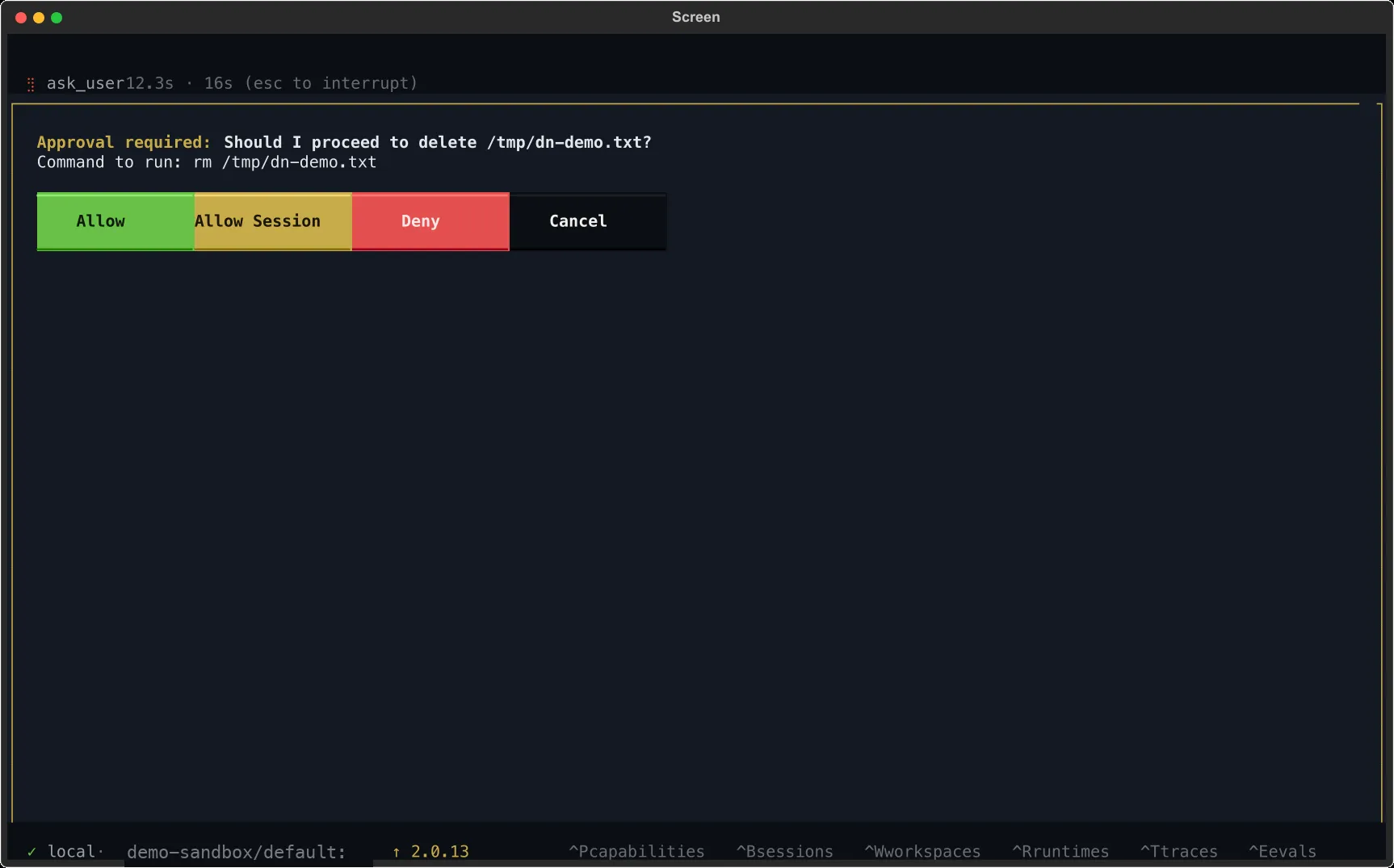
Section titled “Interactive mode (default)”Every destructive or consequential tool call opens a permission prompt before it runs. You see the tool name, the arguments it wants to pass, and four responses:
| Response | Effect |
|---|---|
Allow | Run this call. The next one will prompt again. |
Allow Session | Run this call and auto-approve the rest of the session for this tool |
Deny | Refuse this call. The agent sees the refusal and adapts. |
Cancel | Interrupt the entire turn. |
Allow Session only covers the current session — it resets when you start a new one. There is no persistent always-allow list.
If you want to drop back into interactive mode from anywhere else, run /interactive.
Autonomous mode (/auto)
Section titled “Autonomous mode (/auto)”Autonomous mode turns permission prompts off. The agent runs its own loop — think, call a tool, read the result, think again — until it finishes or hits a step cap.
/auto # swap to autonomous with 100 steps/auto 250 # raise the cap to 250 stepsEach full think-then-act cycle counts as one step. When the cap is reached the turn ends with a visible “reached the maximum number of steps” message, so you always know why the agent stopped — send a follow-up to continue.
![The context bar with an [auto] marker between the agent name and session ID, signalling autonomous mode.](/_astro/tui-autonomy-auto.DeKHhdqn_tCtsp.webp)
Autonomous mode applies to the active session. Other sessions keep whatever policy they were on.
Background tasks (/background)
Section titled “Background tasks (/background)”/background <task> spins up a brand new session with a 100-step autonomous budget and hands it the task text. The new session runs in parallel — you stay in the one you were on. /bg is the short alias.
/bg audit the Dockerfile and list anything that could run as rootBackground sessions show up in the session browser (Ctrl+B) with a title like [auto 14:32] audit the Dockerfile.... Switch into one to watch it live, or let it finish and read the transcript later. You get a flash notification when it succeeds or fails.
Use background for work that does not need your input — audits, enumerations, scripted sweeps. Anything that benefits from you in the loop should stay on the foreground session.
Swapping policies directly
Section titled “Swapping policies directly”/auto and /interactive are shortcuts over a policy registry. Other policies — including ones shipped by capabilities — live behind /policy.
| Command | What it does |
|---|---|
/policy | List every registered policy |
/policy <name> | Swap to <name> |
/policy <name> k=v k=v ... | Swap with spec arguments (e.g. /policy headless max_steps=50) |
Argument values coerce to int, float, or bool when they look like one; otherwise they’re strings.
The raw headless policy has no implicit step budget. /policy headless runs until the agent finishes or reaches its own configured limit; use /policy headless max_steps=100 when you want a policy-level cap. /auto and /background apply their 100-step product default explicitly.
A capability can register a custom policy — a different step cap, an event-hook bundle for observation or scoring, or any combination of @hook-decorated agent-event handlers. If /policy lists a name you don’t recognize, it came from a loaded capability. See Policies for how to author one.
Choosing a mode
Section titled “Choosing a mode”| If you’re… | Use |
|---|---|
| Exploring a new target and want to review every tool call | Interactive |
| Running a known-good workflow and tired of approving reads | Interactive + Allow Session |
| Letting the agent grind on a bounded problem | /auto |
| Firing off a side task while you work on something else | /background |
| Enforcing a capability’s own approval rules | /policy <custom> |
Whatever you pick, the context bar shows the policy on the status line so you always know what the agent is allowed to do next.