
Flags
Boolean capability toggles that gate MCP servers and workers, with CLI, env, and persisted overrides.
Flags are boolean toggles declared in a capability manifest. They gate MCP servers and workers with a when: predicate, and users can flip them from the CLI, an env var, or the TUI without editing the capability.
flags: readonly: description: Hide mutating tools and read-only mode default: false burp: description: Route traffic through Burp Suite at :9876 default: falseDeclare the flag once, reference it from any gate-eligible component, and let operators toggle it per environment.
Declaration rules
Section titled “Declaration rules”Each flag is a named entry with a description and optional default:
| Field | Required | Notes |
|---|---|---|
description | yes | Non-empty string. Shown in the TUI flag editor. |
default | no | Boolean. Defaults to false when omitted. |
Names match [a-z0-9]([a-z0-9-]*[a-z0-9])? — kebab-case. A capability is capped at 16 flags.
Gating components
Section titled “Gating components”Both MCP servers and workers accept when: for flag gating:
flags:  burp:    description: Route traffic through Burp Suite    default: false  relay-enabled:    description: Run the external event relay    default: false
mcp:  servers:    burp-proxy:      command: node      args: [mcp/burp.js]      when: [burp]
workers:  relay:    command: ${CAPABILITY_ROOT}/bin/relay    args: ['--addr=0.0.0.0:9090']    when: [relay-enabled]
when: is a list of flag names. The component loads if any flag in the list is true (OR semantics). An empty list is a validation error. File-loaded MCP servers (from .mcp.json) cannot use when: — declare them inline in capability.yaml to gate them.
Four layers of resolution
Section titled “Four layers of resolution”Flags resolve through four override layers. Later layers win:
- Default —
default:in the manifest - Persisted binding — per-project state (local:
~/.dreadnode/local-capability-state.json; sandbox:project_capabilities.flags) - Environment variable —
DREADNODE_CAPABILITY_FLAG__<CAP>__<FLAG> - CLI override —
--capability-flag <cap>.<flag>=true|false
A flag set to true on the CLI beats any other layer. A flag set to true in persisted state beats the manifest default but loses to both env and CLI.
Env var conventions
Section titled “Env var conventions”Two env vars are involved. Know which is which:
| Variable | Who sets it | Purpose |
|---|---|---|
CAPABILITY_FLAG__<CAP>__<FLAG> | Runtime | Injected into MCP subprocesses and read by tool modules at import time |
DREADNODE_CAPABILITY_FLAG__<CAP>__<FLAG> | User | Shell-level override — applied as layer 3 |
Capability and flag names convert to UPPER_SNAKE_CASE — dashes become underscores. The capability threat-hunting with flag readonly becomes CAPABILITY_FLAG__THREAT_HUNTING__READONLY.
Accepted values are case-insensitive:
- True:
1,true,on - False:
0,false,off
Anything else is logged as a warning and ignored.
Toggle from the CLI
Section titled “Toggle from the CLI”Pass --capability-flag one or more times when launching the runtime:
dn --capability-flag threat-hunting.burp=true \ --capability-flag threat-hunting.relay-enabled=falseThe format is <capability>.<flag>=<bool>. Malformed entries are logged and skipped — the runtime still starts.
Toggle from the TUI
Section titled “Toggle from the TUI”Press Ctrl+P to open the capability manager, select a capability, and edit flags in the detail panel. Changes persist to the local binding state, which means the flag stays set across runtime restarts until you clear it.
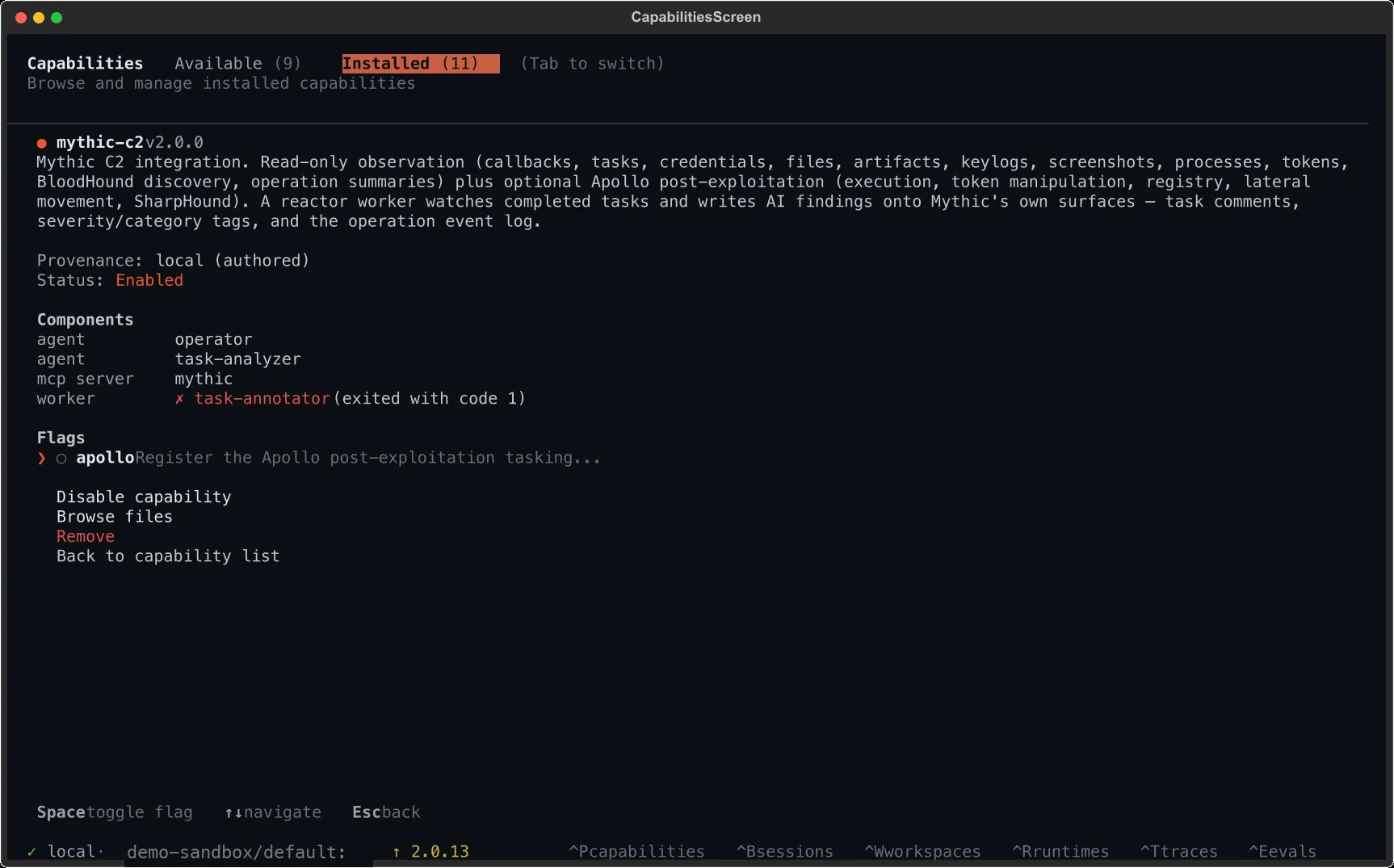
Navigate to a flag row with the arrow keys and press Space to toggle it.
Read flags from a worker or tool
Section titled “Read flags from a worker or tool”Workers and tools receive flag state through the CAPABILITY_FLAG__* env var:
import os
READONLY = os.environ.get("CAPABILITY_FLAG__THREAT_HUNTING__READONLY") == "1"
if READONLY:    # Hide mutating tools    ...
For tool modules loaded by the runtime, flags are set before import — read them at module scope.
For subprocess workers, flags are part of the subprocess environment — read them at startup or re-read on each handler call if you want live changes. See Environment Variables for the full precedence story.