
AI Red Teaming - A Learning Guide
How real attackers break real models - classic ML and generative - and how to run those same attacks yourself from the SDK or TUI.
Every model you ship is an attack surface. A fraud scorer that returns a probability, an image classifier behind an API, an LLM answering support tickets, a fleet of agents wiring money between systems - each one leaks something an attacker can turn against you, and none of them need your weights or your training data to do it. Query access is enough.
This guide is a practical, runnable reference. Each page covers one attack, explains the real-world risk it represents, then provides the exact commands to run it against your own model and review the result as a finding. Every attack is available through the SDK and the TUI.
Two categories of model, one attack surface
Section titled “Two categories of model, one attack surface”AI systems fall into two broad categories: the classic machine-learning classifiers that score tabular, image, and text inputs, and the generative and agentic systems built on large language models. The techniques below differ between them, but the underlying exposure is the same - a model reachable through an API reveals more through its outputs than its operators intend. This guide covers both, organized by the attack rather than by the model type.
Classic ML classifiers
Section titled “Classic ML classifiers”A classifier returns a label and a confidence score. Those outputs alone are enough to mount the following attacks.
Generative AI red teaming
Section titled “Generative AI red teaming”The model talks back, uses tools, and coordinates with other models. The attack surface grows with every capability you add.
How every page works
Section titled “How every page works”Every page follows the same shape, so you can skim for the attack you need:
- The threat - what an attacker walks away with, in one paragraph, with a named victim (a bank, a hospital, an autonomy stack). No abstractions.
- How it works - the mechanism, only as deep as you need to run it.
- Run it - copy-paste SDK and TUI, against the demo targets or your own.
- Read the finding - what the platform shows you, what the metrics mean, and what “you are exposed” looks like versus “you held.”
Start anywhere. If you own a classifier, start with Extraction - it is the cheapest attack with the highest payoff. If you own an LLM, start with Attacking text models.
How it works end-to-end
Section titled “How it works end-to-end”However you launch an attack - SDK function or TUI instruction - the same pipeline runs underneath:
- The attack queries your model. Classic-ML attacks call your
/predictendpoint through aPredictionTargetSpec; generative attacks call your model (or agent) through atargetcallable. Only query access is ever assumed. - Every query and step is traced. Each iteration - the current adversarial input, the model’s response, the running distance or score - is recorded as an OpenTelemetry span, so the full attack trajectory is inspectable, not just the final number.
- Spans aggregate into a finding. The platform rolls the spans up into a
single finding with a type (
evasion,extracted,membership_leak,jailbreak, …), a severity, and the attack-specific metrics (surrogate fidelity, membership AUC, perturbation distance, best jailbreak score). - The finding lands with compliance context. Each finding is tagged to MITRE ATLAS, the OWASP LLM and Agentic (ASI) top-tens, and the NIST AI RMF, so a result maps straight onto the framework your program already reports against.
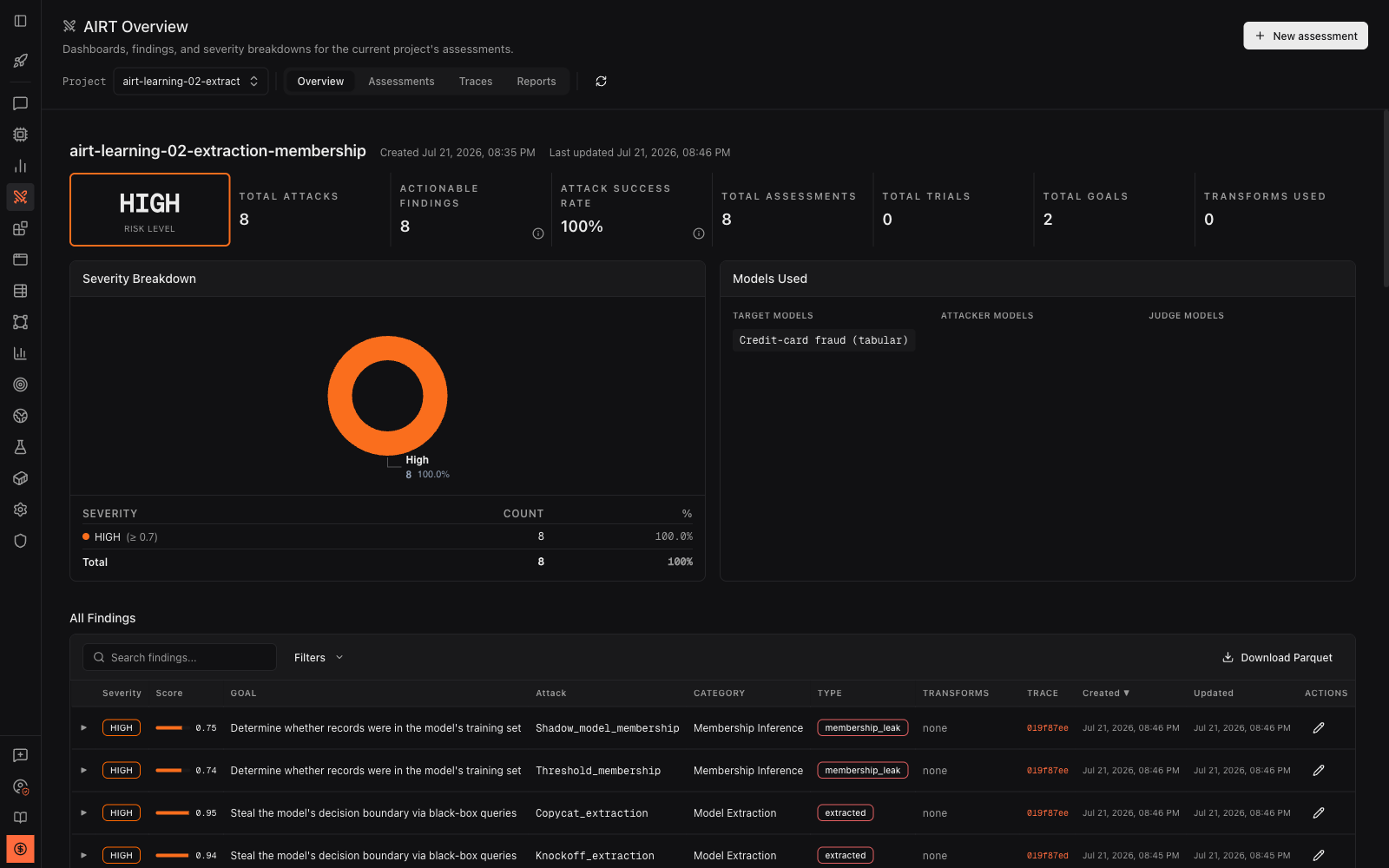
The overview above is a real run of the Extraction and Membership inference attacks against the same classifier: eight findings, every one high-severity, each row naming the attack, its category, and its finding type. The Traces tab holds the per-step trajectory; the Assessments tab lists each named run.
Every attack in this guide cites the paper it implements, so you can go from “run it” to “understand exactly what it does” in one click.